TÜREL.IO

PO Translate by TÜREL.IO

Pay per File · No subscription

Translate PO files.
Make WordPress
feel local.

Turn your theme or plugin’s PO and POT files into translations you can review, refine and release.

Advanced AI translates missing strings and improves existing wording, with checks for placeholders, HTML and plurals. You approve the final result.

Start with a free inspection. No account needed.
Public paid checkout is currently closed.

01 / The workflow

Upload. Translate. Download.

One file, from first inspection to final approval. Pricing and payment happen inside the process, before AI translation begins.

  1. Upload

    Start with a free inspection

    Upload a UTF-8 PO catalog or POT template. Inspect translation coverage and technical findings without an account, then choose your source and target languages.

  2. Translate

    Exact quote. One-time payment.

    Check your file’s eligibility and exact price before payment. When public checkout opens, sign in, verify your email and pay once to start AI translation. Then accept, edit or reject the suggestions.

  3. Download

    Your approval comes first

    Review the wording and technical findings, approve your changes, then export an editable PO, compiled MO or ZIP package. Test the translation in your WordPress theme or plugin before release.

Available now: free technical inspection. The paid translation journey opens when public checkout is enabled.

02 / In the catalog

A new language.
Still your WordPress file.

English → German, in three familiar theme and plugin strings. These hand-written PO excerpts illustrate the intended result; they are not customer files or measured AI output.

Inspect the original hand-written PO example
Hand-written marketing example. Not a measured AI result.

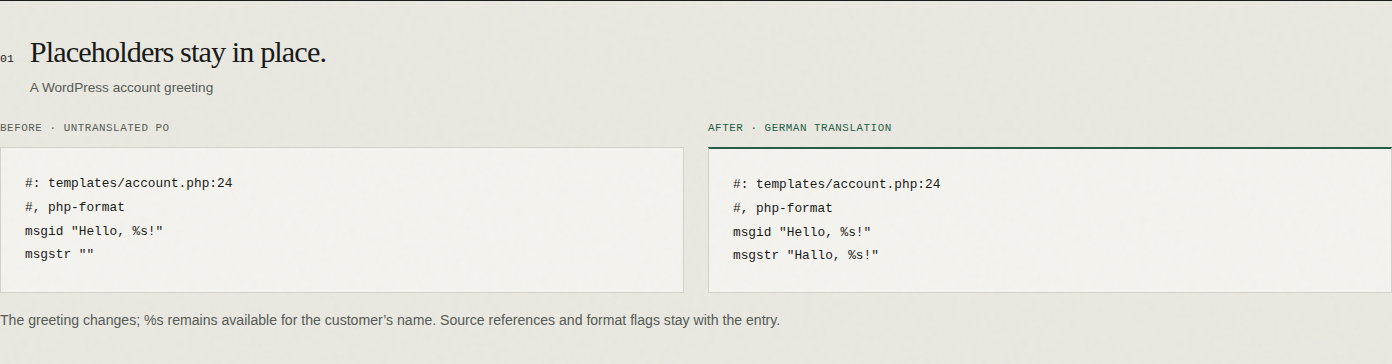
Placeholders stay in place.

A WordPress account greeting

Before · Untranslated PO

#: templates/account.php:24
#, php-format
msgid "Hello, %s!"
msgstr ""

After · German translation

#: templates/account.php:24
#, php-format
msgid "Hello, %s!"
msgstr "Hallo, %s!"

The greeting changes; %s remains available for the customer’s name. Source references and format flags stay with the entry.

Translate the words. Keep the markup.

A link in a plugin’s settings screen

Before · Untranslated PO

#: admin/settings.php:86
#, php-format
msgid "Read <a href=\"%s\">our guide</a>."
msgstr ""

After · German translation

#: admin/settings.php:86
#, php-format
msgid "Read <a href=\"%s\">our guide</a>."
msgstr "Lesen Sie <a href=\"%s\">unsere Anleitung</a>."

The link text is translated while the HTML, URL placeholder and PO quote escaping are preserved.

One comment. Many comments.

Singular and plural theme strings

Before · Untranslated PO

#: comments.php:32
#, php-format
msgid "%d comment"
msgid_plural "%d comments"
msgstr[0] ""
msgstr[1] ""

After · German translation

#: comments.php:32
#, php-format
msgid "%d comment"
msgid_plural "%d comments"
msgstr[0] "%d Kommentar"
msgstr[1] "%d Kommentare"

Both German plural forms are filled, and each keeps %d. This example uses the catalog header Plural-Forms: nplurals=2; plural=(n != 1);. Other target languages can require different forms.

Inspect your own PO or POT file

03 / Built for gettext

Translation with the details intact.

From the first empty string to the final export, keep your project’s language and technical structure in the same workflow.

Advanced AI translation

Fill missing translations and improve existing wording. Use applicable project glossary terms and approved translation memory to keep terminology consistent.

PO catalogs & POT templates

Start from an existing translation or a source template. Choose a target locale; POT templates receive its language and plural metadata.

Up to 10,000 active entries

Work with eligible files up to 4 MiB, within processing limits. Eligibility is checked before payment; oversized files are never silently translated in part.

WordPress structure, preserved

Keep placeholders, HTML, shortcodes and plural forms in view. Technical checks flag structural differences so you can resolve issues before export.

Human editing & approval

Compare the source, current translation and AI suggestion. Accept, edit or reject changes in the existing PO Translate workspace. You make the final decisions.

PO, MO & ZIP exports

Download an editable PO catalog, a compiled MO for your project or a ZIP package after approval. Editing and export are part of the translation workflow.

Technical checks support your review; they do not certify linguistic accuracy. The free checker accepts up to 10,000 total entries, six plural forms and 16 KiB per text field. It shows the first 250 findings, with counts for all findings. Invalid or resource-intensive catalogs can be rejected.

04 / Pay per File

Know the price.
Then decide.

No subscription. No recurring plan. See the exact quote for your eligible file before you commit to AI translation.

Free technical inspection

Check your file first.

FreeNo registration

  • Inspect coverage and missing translations.
  • Check placeholders, HTML, shortcodes and plurals.
  • See technical findings without an AI request.

Files are processed in server memory and are not saved to our database or object storage.

Inspect your file free

05 / A few useful answers

PO & POT translation, explained.

Have a file-specific question?
Contact support.

How do I translate a PO file online?

Open PO Translate, upload a UTF-8 .po file and choose source and target languages. Technical inspection is free. For AI translation, check eligibility and the exact per-file quote, then sign in and pay when public checkout opens. Review and edit the suggestions before exporting PO, MO or ZIP. Public paid checkout is currently closed.

What is the difference between PO, POT and MO files?

A POT file is a gettext source template. A PO file pairs those source strings with translations for one locale. An MO file is the compiled catalog used by WordPress and other gettext applications. PO Translate accepts PO and POT input and exports PO, MO or a ZIP package after review.

Can I translate a WordPress POT template into a PO file?

Yes. Upload your theme or plugin’s UTF-8 POT template and explicitly select a target locale. The working catalog receives the target language and plural metadata. After AI translation and human approval, export the translated PO or compiled MO. Free technical inspection is available before you choose a target.

How do I use the translation in a WordPress theme or plugin?

Export the approved catalog and use the filename, locale and language directory expected by your theme or plugin. MO files provide compiled gettext translations; keep the PO file for future edits. Test the result on a staging site. This workflow translates catalog strings, not WordPress posts, pages or JavaScript translation JSON.

Will HTML, placeholders and plural forms be preserved?

The workflow checks placeholders such as %s and %d, HTML tags, entities, shortcodes and required plural forms. Review any flagged differences before export. Required plural forms follow the catalog header; a clean technical check does not prove that the language or its plural rule is correct. Human review is still needed.

Is PO Translate free? Do I need a subscription?

Technical inspection is free, needs no registration and makes no AI request. Advanced AI Translation uses Pay per File pricing, from USD $10, with an exact quote before purchase and applicable tax shown at checkout. There is no subscription. Public paid checkout is currently closed; you can inspect your file now.

How large can my PO or POT file be?

Eligible AI jobs support up to 10,000 active entries and 4 MiB, subject to processing limits checked before payment. The free checker accepts up to 10,000 total entries, six plural forms and 16 KiB per text field. It displays the first 250 findings, with counts covering all findings. Invalid or resource-intensive catalogs can be rejected.

Can I edit PO translations or convert PO to MO?

Yes, within the existing translation and review workflow. You can edit suggestions, approve changes and export a compiled MO alongside your PO or ZIP. These are workflow features, not a separate free PO editor or unrestricted format converter. MO files are not accepted as input.

Can I translate an existing PO file into another language?

Yes. Choose the new target and confirm a fresh translation to clear existing translations in the working copy while preserving the uploaded file. To improve existing translations, keep their original target language. Identical source and target locales cannot be purchased; en_US/en_GB and pt_PT/pt_BR adaptations are supported in either direction. The quote is recalculated before payment.

What happens to my uploaded file and translation data?

Free inspection processes your file in server memory without saving it to the database or object storage, and sends no content to OpenAI. If you continue toward payment, the file and options are saved on your device for up to two hours to bridge sign-in and checkout. Paid AI processing sends the needed strings and applicable glossary or translation-memory context to OpenAI. Paid review history and artifacts follow the retention and deletion rules in our Privacy Policy.

What if AI processing is interrupted?

Completed batches are saved. Safe interruptions resume from saved work. An uncertain provider call needs support reconciliation; your purchase remains linked to the job. Do not pay again while confirmation or reconciliation is pending.
Your next language starts here

Bring your file.
See what needs translating.

Inspect a file free

Free inspection now. Paid checkout closed.

Original product evidence